Researcher Knowledge Workflows
The Complete Note-Taking System for Researchers
A working note taking system for researchers has exactly four layers: capture (papers into a reference manager), process (annotations into literature notes), connect (literature notes into your own claims), and retrieve (everything findable when you sit down to write). Most researchers only build the first layer, which is why a Zotero library with 2,000 items so often coexists with a blank page at writing time.
This article is the map of the whole system. Each layer gets its own tools, its own habits, and its own failure modes, and I’ll be specific about all three — including a version you can set up in 30 minutes and the full version that takes a weekend. The detailed setup guides for individual pieces live in their own articles, linked as we go.
Why researchers’ notes fail
The dominant failure is not disorganization. It’s the collector’s fallacy: the feeling that saving a paper is the same as engaging with it. Downloading a PDF produces a small hit of accomplishment that costs nothing, so libraries grow at the rate of curiosity while understanding grows at the rate of actual reading — a much slower rate. The gap between the two is where most systems die.
The second failure is highlight graveyards. Annotating feels like processing, but a highlight is a bookmark for a thought you haven’t had yet. If highlights never get turned into sentences you wrote, they decay: six months later, a yellow stripe across someone else’s paragraph tells you almost nothing about why it mattered.
The third failure is fragmentation. Notes about methods in a Google Doc, reactions to papers in the margins of PDFs scattered across three devices, half-ideas in Apple Notes, and project thinking in whatever the lab uses this year. Each location is individually defensible. Collectively they guarantee that at writing time you will not check all of them, and the system silently loses whatever you can’t find.
A system fixes these only if it does two things: it forces a cheap-but-real processing step between “saved” and “done,” and it puts every durable thought in one searchable place. That’s what the four layers are for.
The four layers
- Capture — every paper, chapter, and preprint goes into one reference manager with its PDF attached and metadata correct. Nothing lives in a Downloads folder.
- Process — reading happens with annotations; annotations get distilled into one literature note per source, in your own words, in your notes app.
- Connect — recurring ideas get promoted out of individual literature notes into standalone permanent notes — your claims, not the authors’ — linked to the evidence.
- Retrieve — search, links, and index notes (maps of content) make the whole thing usable when you’re drafting a paper, a lit review, or a grant.
Each layer only has to be good enough to feed the next one. That’s the design principle that keeps this from becoming a hobby: you are not building a beautiful archive, you are building a pipeline that ends in your own writing.
Layer 1: Capture
The reference manager is the system’s foundation, and in 2026 the default answer for most academics is Zotero. It’s free and open source, version 9 (released April 2026, currently 9.0.6) has a fast built-in PDF/EPUB reader with proper annotation types, the browser connector grabs metadata and PDFs in one click, and the plugin ecosystem — Better BibTeX above all — is what makes the later layers possible. Sync is free for metadata; file storage above 300 MB costs $20/year for 2 GB, $60 for 6 GB, or $120 for unlimited, and you can sidestep that entirely with WebDAV if you’re willing to run your own storage.
Honest trade-offs against the alternatives: Paperpile ($2.99/month academic) is smoother if your writing lives entirely in Google Docs, but its plugin ecosystem is thin and export to a notes app is clumsier. EndNote is what your institution may already license and what some journals’ submission workflows assume, but it is closed, slow-moving, and effectively a dead end for the connect layer. Mendeley has been in managed decline since Elsevier retired the desktop app; there is no reason to start there in 2026. If you’re already deep in one of these, the capture layer still works — but every guide on this site assumes Zotero because it’s the only option where layers 2–4 don’t fight you.
Capture rules that matter more than the tool: one library, not per-project libraries (projects are collections and tags, not silos); the PDF attached at save time, because you will not go back for it; and a ten-second triage on save — file it into a collection or tag it with the project it’s for. Untriaged captures are how the collector’s fallacy gets its foot in the door.
Layer 2: Process
This is the layer most systems skip, and it’s the one that produces all the value. Processing means: read the paper in Zotero’s reader, annotate as you go, then — within a day or two — distill those annotations into a single literature note: what the paper claims, what the evidence actually was, what you’d push back on, and how it touches your project. In your words. Usually 150–400 of them.
The mechanics of getting annotations out of Zotero and into your notes app are covered step by step in our Zotero + Obsidian guide; what to write once they’re there — including templates and the difference between summarizing and distilling — is the subject of our literature notes guide. The one-sentence version of both: automate the transfer completely, never automate the thinking.
Two constraints keep this layer honest. First, the literature note is written from your annotations, not by rereading the paper — if your highlights can’t support a note, you weren’t really reading. Second, not every paper earns a full note. Skimmed papers get one line (“cited for the 2019 dataset; methods section is the useful part”) and that’s fine. The system needs a record of why the paper is in your library, not a book report.
Layer 3: Connect
Literature notes are still organized by source. Your thinking isn’t — it’s organized by problem. The connect layer is where you maintain a set of permanent notes: one note per idea you actually hold, titled as a claim (“Self-report measures inflate adherence estimates”), written to stand alone, and linked to the literature notes that support or complicate it.
This is Zettelkasten-lite, and the “lite” is deliberate. The full Luhmann apparatus — numbered IDs, strict atomicity, folgezettel sequences — is a productivity subculture, not a research requirement. What transfers to academic work is just: claims as notes, links instead of folders, and the habit of asking “does this connect to something I already think?” every time you finish a literature note. Ten well-linked permanent notes will do more for your next paper than a hundred orphaned summaries. The same pruning applied to the second-brain framing — which parts of Forte’s PARA and CODE survive contact with a PhD — is in our second brain for researchers guide.
The tool for this layer is Obsidian (free for personal and academic use; version 1.13 as of mid-2026). Plain Markdown files on your own disk, first-class [[wikilinks]] with backlinks, and community plugins that talk directly to Zotero. Versus Notion, which is the comparison people actually ask about: Notion is a better team wiki and a better database of things, and its Zotero story is limited to third-party integrations that copy metadata into database rows. But connection-making is the whole point of this layer, and Notion’s linking is heavier, its pages live on someone else’s servers in a proprietary format, and its full-text search across a few thousand notes is noticeably worse. For a lab’s shared protocols, use Notion. For your own thinking, the local-files-plus-links model wins. Our full walkthrough of vault structure, plugins, and academic-specific setup is in our guide to Obsidian for academic research.
Layer 4: Retrieve
Retrieval is where the system pays rent, and it has three mechanisms that cover three different situations.
Search covers “I know I read this somewhere.” Obsidian’s full-text search across literature and permanent notes, plus Zotero 9’s full-text search across PDFs themselves, means the answer is two queries away at most — if layers 1–3 put the material there.
Links and backlinks cover “what do I know that’s related to this?” Open a permanent note and its backlinks panel shows every literature note and project note that touches it. This is the mechanism that surfaces the connection you forgot you made — the closest thing to a genuine unfair advantage this system offers.
Maps of content (MOCs) cover “I’m starting a lit review / paper / grant.” A MOC is just a note that curates links: [[MOC - Measurement validity]] listing the twelve permanent notes and thirty literature notes relevant to that theme, with a sentence of orientation each. You build MOCs lazily — only when a cluster gets big enough to need one — and they become the skeleton of your related-work sections. Drafting starts by opening the MOC, not by opening a search engine.
The minimal version: 30 minutes
You do not need the full system to stop losing your reading. The starter version:
- Install Zotero 9 and the Zotero Connector for your browser (zotero.org, both free) — 5 minutes.
- Create a free zotero.org account and turn on sync in Edit → Settings → Sync — 3 minutes.
- Adopt one annotation convention: yellow = claim/finding, red = disagree or methods problem, blue = follow this citation. Zotero’s reader remembers your last color; switching is one click — 2 minutes to decide, zero to maintain. The reasoning behind this convention, and the marginal-comment habit that makes it pay off, is in our guide to annotating research papers.
- Create a
Literature Notesfolder anywhere durable — an Obsidian vault if you’re ready, a plain folder of Markdown files if you’re not — 5 minutes. - Write one literature note for the last important paper you read, from memory and your highlights, using this skeleton: Claim / Evidence / My objection / Connects to — 15 minutes.
That’s the whole pipeline in miniature: capture, process, a gesture at connection, one searchable place. The habit it installs — every serious read ends with a note in your own words — is 80% of the value. Everything below is amplification.
The full version
The complete build, in dependency order:
- Zotero 9 with the Better BibTeX plugin for stable citation keys — the identifier that ties a note to its source forever.
- Obsidian with a deliberately boring vault:
literature/,notes/(permanent),projects/,mocs/. Resist deeper hierarchy; links do the organizing. - The Zotero → Obsidian bridge: the Zotero Integration community plugin, an import template that pulls your annotations (with colors and page-linked citations) into a pre-structured literature note, and a citekey-based filename convention. Full setup, including a working template you can paste in, is in our Zotero + Obsidian guide.
- A literature note template with distillation prompts, per our literature notes guide.
- Permanent notes and MOCs as described above — these need conventions, not tools.
- Optional extensions, added only when you feel the specific pain they solve: Dataview or Obsidian’s built-in Bases for querying your literature notes as a table (“everything tagged
#methods/surveyfrom 2023 on”), spaced-repetition plugins if you’re pre-quals, and read-later integrations for non-paper sources.
Total cost of the core system: $0, plus optionally Zotero storage ($20–120/year) and Obsidian Sync ($4/month) if you want frictionless multi-device use. When we evaluate paid add-ons on this site, the bar they have to clear is described in how we test AI research tools: they must beat this free baseline at a real task, not at a demo.
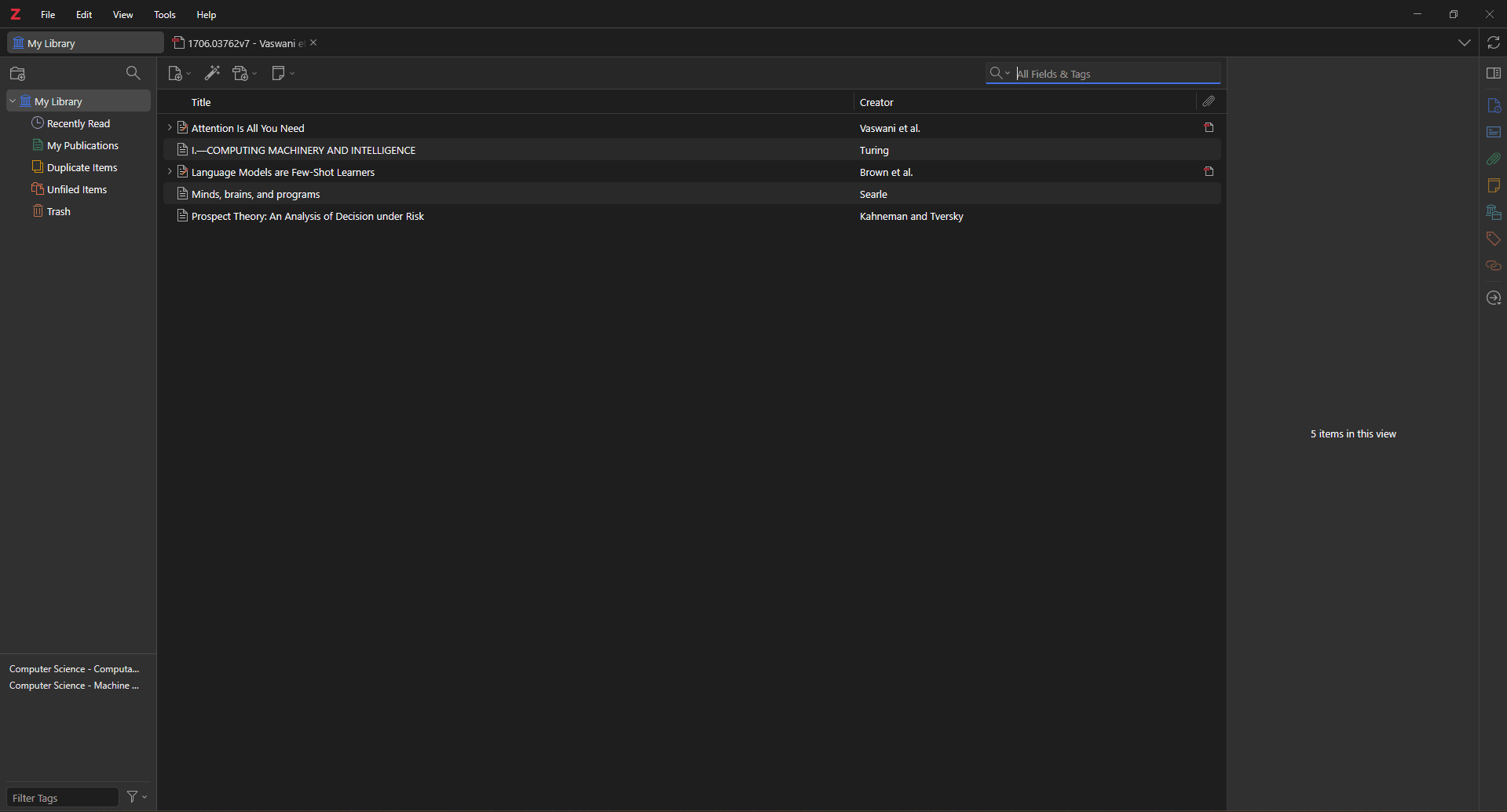
The capture layer in its simplest working state: five papers pulled in by DOI and arXiv ID with complete metadata, no manual typing. Everything else in this system is built on top of a library like this one.
Maintenance habits
Systems don’t fail at setup; they fail at week six. The maintenance load that keeps this one alive is honestly small:
- The 48-hour rule. Annotations become a literature note within two days of finishing the paper, while you still remember why you highlighted things. Ten minutes per paper. This is the only non-negotiable habit in the system.
- A weekly sweep (15 minutes). Clear the Zotero inbox — everything captured this week gets triaged or deleted. Skim the week’s literature notes and ask the connect question: does anything here deserve a permanent note or a link to one?
- MOC gardening at project boundaries. When you start or finish a paper, spend 30 minutes updating the relevant MOC. Not weekly — MOCs curated on a schedule turn into chores; MOCs curated at project boundaries turn into outlines.
- Never reorganize. No folder restructures, no tag taxonomies redesigns, no migrations to this month’s app. Every hour spent perfecting the system is an hour visibly not spent using it, and the retrieval layer doesn’t care how pretty the folders are.
Common failure modes
Rebuilding instead of using. The most seductive failure. If you have changed note templates three times but written four literature notes, the system has become the hobby. Freeze the setup for 90 days and only process.
Import-everything syndrome. Bulk-importing 400 papers’ worth of old annotations into Obsidian on day one creates a landfill that makes search worse, not better. Backfill lazily: import an old paper’s annotations only when a current project touches it.
Notes without a customer. Every literature note should be able to answer “which future writing task is this for?” If you can’t name one — not even “my eventual dissertation’s related work” — you’re transcribing, and the collector’s fallacy has just moved up a layer.
Skipping the connect layer. The system still works as capture-process-retrieve; plenty of productive researchers stop there. But if you skip permanent notes, be honest that you’ve built a very good filing cabinet, and don’t expect it to hand you arguments. The compounding returns — the backlink that surfaces a two-year-old objection exactly when a reviewer raises it — live entirely in layer 3.
Tool-chasing. A new AI research tool ships every week, and some genuinely help (that’s most of what this site covers). But tools slot into layers; they don’t replace the pipeline. An AI summary of a paper you never read is a literature note with no author — worse than nothing, because it looks like processing.
Where to go next
Build in this order: the 30-minute starter today, then the Zotero + Obsidian bridge when the manual transfer starts to chafe, then real literature note craft, then the full Obsidian research setup once you have enough notes to be worth organizing. The system is deliberately modular — each layer is useful alone, and none of them requires you to believe in the whole architecture before it starts paying you back.